
How to Build Enterprise AI Agents: Architecture, Guardrails, Tools & Human Oversight
Building enterprise AI agents requires more than connecting a large language model to business data. It involves designing the right agent architecture, integrating reliable tools, establishing security and governance guardrails, and defining where human oversight is essential. This blog explains how enterprises can build AI agents that are secure, scalable, accountable, and aligned with business goals while balancing autonomy with human control.
Anyone can build an AI agent for a demo. A weekend, an LLM API key and some enthusiasm will get you something impressive to show in a meeting.
Getting that same agent to operate safely inside a real enterprise is a completely different job. Now it's touching your CRM, your ERP, your databases, your identity systems and your customers' data. A demo that hallucinates is funny. A production agent that issues the wrong refund or leaks a customer record is a very expensive Monday.
We build these systems at Applore, and the gap between demo and production is where most projects die. It's rarely the model that fails. It's the missing architecture, permissions, guardrails, evaluation and the unanswered question nobody wants to own: when does the AI act alone, and when must a human step in?
This guide is the framework we use to close that gap. If you're planning to build enterprise AI agents this year, work through it before you write a line of code.
What an enterprise AI agent actually is
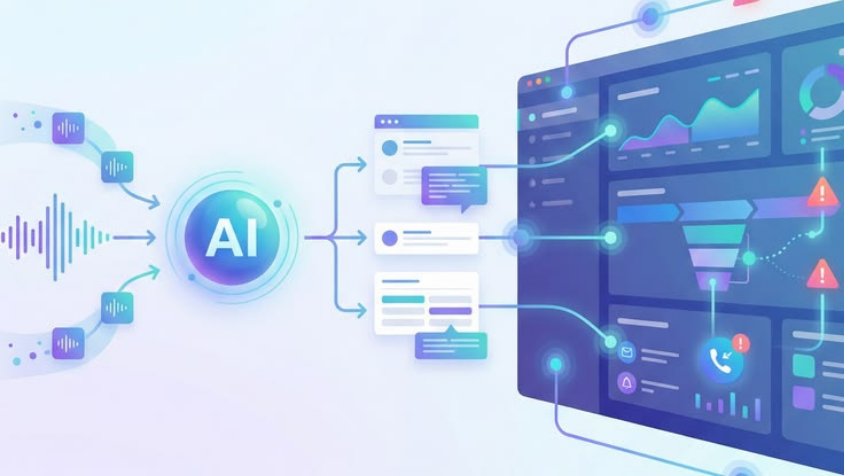
An enterprise AI agent performs defined business tasks using reasoning, data and approved tools. The simplified flow: user request, agent, reasoning, tools, enterprise systems, result.
Say an employee asks the agent to "create a support ticket for this customer's unresolved payment issue." The agent identifies the customer, pulls the account, reviews payment status and past interactions, creates the ticket, attaches the context and notifies the right team. It's not generating text. It's running a workflow. That distinction shapes everything that follows, and if you want examples of which workflows are worth automating first, we've covered the strongest agentic AI use cases for enterprises separately.
Start with the process, not the model
The first mistake in enterprise AI development is starting with model selection. Start with the workflow instead.
Map it as trigger, inputs, decisions, actions, outcome. A customer complaint, for instance: identify the customer, retrieve the order, check policy, determine the solution, execute the approved action, update the CRM, notify the customer. Only once that's on paper can you decide which steps stay manual and which the agent takes over. Skip this step and you'll automate a process nobody fully understands, which is how AI projects turn into rework.
The five-layer architecture
Every production agent we build has the same core layers.
- Interaction layer: Where requests enter: a web app, mobile app, chat interface, email, API or internal tool.
- Orchestration layer: The brain of the operation. It decides what needs to happen, which tools are required, what information is missing, whether the task is done and when to escalate.
- Model layer: The LLM provides reasoning, classification, language understanding, planning and tool selection. Treat it as one component of the application, not the application itself. Teams that build everything around the model end up rebuilding when the model changes.
- Tool layer: Tools are how the agent acts: search, CRM and ERP APIs, databases, ticketing, email, knowledge bases. Every tool access must be controlled.
- Data and context layer: Documents, customer records, product data, policies, transaction history. Access follows business permissions, always.
Design tools like contracts, not suggestions
Tool design is where agent safety is won or lost. Every tool needs a clear purpose, defined inputs and outputs, permission requirements, validation and error handling. It should accept exactly a customer ID, transaction ID, amount and reason. Nothing else. The moment a tool lets the model pass arbitrary instructions into a financial system, you no longer have a guardrail. You have a hope.
Least privilege, no exceptions
Give the agent access to only what its role requires. A support agent might read customer profiles, order history and tickets, and write new tickets and internal notes. It should never be able to delete accounts, touch payroll or browse unrelated employee records.
This isn't paranoia. It's blast radius control. When an agent makes a mistake, and every agent eventually does, the least privilege is the difference between a corrected ticket and an incident report.
Build guardrails into the architecture itself
Guardrails define what the agent can and cannot do, and they belong in the system design, not in the prompt. In practice that means input controls that validate requests, data controls that restrict sensitive information, tool controls that limit available actions, output controls that validate responses, transaction limits on sensitive operations, and approval controls that require human authorisation for high-risk activity.
If a guardrail only exists as a sentence in a system prompt, assume it will eventually be bypassed.
Human-in-the-loop: the three-tier model
Full autonomy is the wrong goal for most enterprise workflows. What works is splitting actions by risk.
Low risk, the agent acts automatically: creating a support ticket. Medium risk, the agent prepares the action and requests approval: a refund near the policy limit. High risk, a human decides: any large financial transaction.
This structure keeps productivity gains while keeping people accountable for the decisions that matter. In our experience it's also what gets security and compliance teams to say yes, which matters more than any benchmark.
Validate before every execution
Before an agent executes anything, check identity, permissions, required fields, business rules, transaction limits and data consistency. An agent recommending a refund is fine. Executing it should only happen after confirming the customer is authenticated, the transaction is valid, the amount is within limits and policy allows it. Recommendation and execution are separate steps. Keep them that way.
Plan for exceptions, because production is exceptions
Real workflows are messy. Data goes missing, APIs fail, customers contradict themselves, policies have gaps, systems go down. Your agent needs a defined behaviour for each, and "retry" is not a strategy. Often the correct action is the least glamorous one: escalate to a human, with full context attached. An agent that escalates well is worth more than one that guesses confidently.
Memory, context and retrieval
Some agents need context across interactions, but storing everything is a liability, not a feature. Decide deliberately what persists, for how long, who can access it, how it gets deleted and how sensitive information is protected.
For internal knowledge, retrieval systems let the agent pull SOPs, policies and documentation on demand instead of relying on what the model memorised. One warning from the field: retrieval quality is a ceiling on agent quality. An agent reading outdated documentation confidently makes wrong decisions. Maintain source ownership, update processes, access controls and versioning, or your agent will faithfully automate your stale content.
Evaluate like you mean it
A successful demo proves nothing about production readiness. Build test scenarios across five categories: normal cases, edge cases, failure cases with missing or bad data, security cases with unauthorised requests, and adversarial cases where someone actively tries to manipulate the agent.
Then measure task completion, accuracy, tool selection, error rate, escalation behaviour and safety. If you haven't tested the adversarial cases, someone else will test them for you in production.
Observability and security
A production agent must leave a trace: what request it received, what it retrieved, which tools it called, what it did, where it failed and whether a human intervened. Without that trail, debugging is guesswork and audits are painful.
Security runs through the whole stack: authentication (who is asking), authorisation (what they're allowed), data security (what the agent can see), tool security (what it can do), auditability (can activity be reconstructed) and secrets management (are credentials protected). Agents operate inside defined security boundaries or they don't go live.
The multi-agent trap
At some point someone will propose a research agent, a planning agent, an execution agent, a validation agent and a manager agent to coordinate them all. Resist, at least at first. Multi-agent systems multiply complexity, cost and failure modes. Ask one question: does this workflow genuinely require multiple specialised agents? Nine times out of ten, a single agent with well-designed tools is easier to build, cheaper to run and far easier to debug.
Integration is the real payoff
The biggest advantage of custom AI agents is that they become an intelligent orchestration layer across the systems you already own. The agent sits between your people and your CRM, order system, ticketing and knowledge base, making all of them easier to operate. You're not replacing existing software. You're finally connecting it. That's why agent projects sit so naturally alongside broader digital transformation and IT consulting work: the agent is often the layer that makes a modernisation programme visible to employees.
Build or buy?
Build custom when existing products don't fit the workflow, deep integrations are required, business rules are highly specific, security controls need customisation, or the workflow is strategically important. Buy when the workflow is standardised and a mature product already exists. Both answers are respectable. Building the wrong one isn't.
The development lifecycle we run
Nine phases, in order: discovery to understand the business problem, workflow mapping, architecture design covering models, tools, data and integrations, a limited prototype, evaluation across normal and edge cases, guardrail implementation, a pilot with a limited user group, optimisation based on measured performance, and only then scale.
Notice where "scale" sits. Last. Every phase before it exists to earn it.
Conclusion
Building enterprise AI agents is much more than connecting an LLM to an API. Production readiness means business workflow plus model plus tools plus enterprise data plus permissions plus guardrails plus evaluation plus observability plus human oversight. Miss one and you'll find out which one in production.
The goal is not maximum autonomy. It's appropriate autonomy: agents designed around real workflows, measurable outcomes and clearly defined controls that augment your people instead of adding another AI interface nobody trusts.
If you're scoping an agent build, talk to Applore. We'll review your workflow, pressure-test the architecture and tell you honestly whether to build, buy or wait. That conversation costs you an hour and can save you a failed pilot.
Frequently asked questions
What are enterprise AI agents?+
AI-powered systems that perform defined business tasks while interacting with organisational data, applications and workflows.
How do you build an enterprise AI agent?+
Define the business workflow first, then design the architecture, model, tools, data access, guardrails and evaluation framework.
What are AI agent guardrails?+
Controls that restrict an agent's access, decisions and actions to approved business and security boundaries.
What is human-in-the-loop AI?+
Humans review or approve selected AI
Should enterprise AI agents be fully autonomous?+
Not usually. Bounded autonomy with human oversight is more practical and safer for enterprise workflows.
When should a company build custom AI agents?+
When it needs specialised workflows, proprietary integrations, customised security controls or capabilities existing platforms can't provide.